Rotatable Cartesian Arm Solution
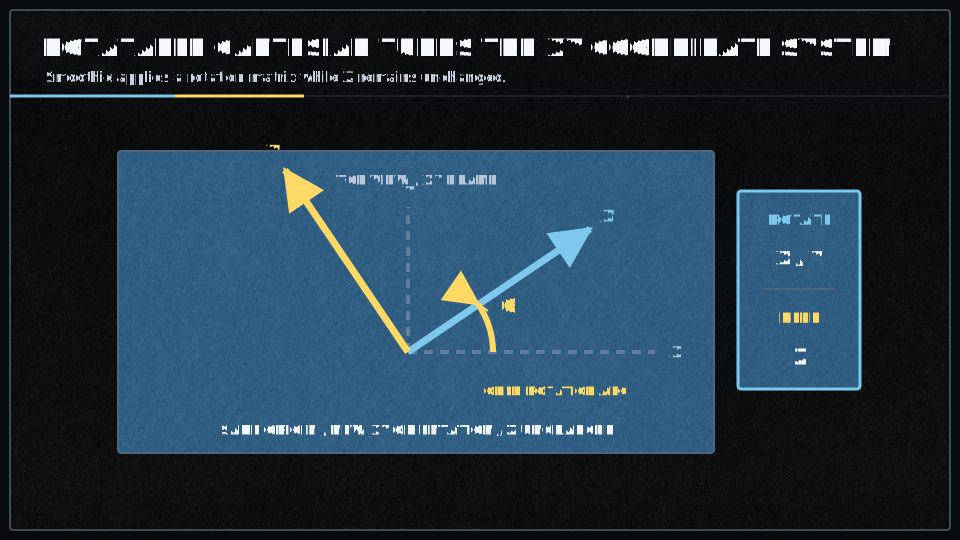
Rotatable Cartesian is a variant of the standard Cartesian arm solution that allows you to rotate the entire coordinate system by a specified angle.
This is useful when your machine’s physical frame is not aligned with the desired working coordinate system, or when you want to work at an angle without physically rotating your workpiece or machine.
What is Rotatable Cartesian?
In a standard Cartesian system, the X, Y, and Z axes are fixed relative to the machine’s frame. The Rotatable Cartesian solution applies a rotation transformation to the X-Y plane, effectively rotating your coordinate system by a specified angle.
Key characteristics:
- The Z axis remains vertical (no rotation in Z)
- The X and Y axes are rotated in the horizontal plane by the specified angle
- All G-code coordinates are automatically transformed to the rotated frame
- Each motor still controls a single linear axis (unlike CoreXY)
Mathematical Transformation
The rotatable cartesian solution applies a 2D rotation matrix to the X and Y coordinates:
Alpha position = cos(angle) × X - sin(angle) × Y
Beta position  = sin(angle) × X + cos(angle) × Y
Gamma position = Z (unchanged)
Where angle is the rotation angle specified in the configuration (converted from degrees to radians).
When to Use Rotatable Cartesian
Rotatable Cartesian is useful in specific scenarios:
- Misaligned Machines: Your machine frame is built at an angle, but you want to work in a standard X/Y coordinate system
- Angled Workpieces: You have a workpiece mounted at an angle and want to mill/cut along its natural axes
- Workspace Optimization: You want to maximize usable workspace when your machine is positioned at an angle to your work table
- Calibration Compensation: Your machine has a slight angular misalignment that you want to correct in software
Configuration
To configure your machine to use the Rotatable Cartesian arm solution, add this to your configuration file:
arm_solution rotatable_cartesian
Angle Parameter
The rotation angle is specified using the alpha_angle parameter:
alpha_angle 45.0 # Rotation angle in degrees (default: 0.0)
Important notes:
- The angle is specified in degrees (not radians)
- Default value is 0.0 degrees (which makes it equivalent to standard Cartesian)
- Positive angles rotate counter-clockwise when viewed from above (looking down at the X-Y plane)
- The angle is applied to the entire coordinate system
Complete Configuration Example
# Rotatable Cartesian arm solution
arm_solution                                 rotatable_cartesian
alpha_angle                                  30.0    # Rotate coordinate system 30° counter-clockwise

# Alpha (X motor)
alpha_step_pin                               2.0
alpha_dir_pin                                0.5
alpha_en_pin                                 0.4
alpha_steps_per_mm                           80
alpha_max_rate                               12000

# Beta (Y motor)
beta_step_pin                                2.1
beta_dir_pin                                 0.11
beta_en_pin                                  0.10
beta_steps_per_mm                            80
beta_max_rate                                12000

# Gamma (Z motor)
gamma_step_pin                               2.2
gamma_dir_pin                                0.20
gamma_en_pin                                 0.19
gamma_steps_per_mm                           400
gamma_max_rate                               6000
Understanding the Rotation
Example: 45-Degree Rotation
If you set alpha_angle 45.0:
- A command to move to
X10 Y0would result in the toolhead moving to approximatelyX7.07 Y7.07in machine coordinates - A command to move to
X0 Y10would result in the toolhead moving to approximatelyX-7.07 Y7.07in machine coordinates - The Z axis remains unchanged
Coordinate System Visualization
Standard Cartesian (alpha_angle = 0):
      Y
      ^
      |
      |
      +------> X

Rotated Cartesian (alpha_angle = 45):
       Y (rotated)
      ╱
     ╱
    ╱
   +------> X (rotated)
Common Use Cases
Case 1: Machine Built at an Angle
Your machine frame was built with the gantry at 15° to your work table:
arm_solution rotatable_cartesian
alpha_angle  15.0    # Compensate for 15° misalignment
Now when you command X100 Y0, the machine will move 100mm along your work table’s X direction, even though the gantry is angled.
Case 2: Diamond-Oriented Workspace
Your machine is positioned at 45° to maximize diagonal workspace:
arm_solution rotatable_cartesian
alpha_angle  45.0    # Rotate to diamond orientation
Case 3: Small Angular Calibration
Your machine has a 2° misalignment that’s difficult to correct mechanically:
arm_solution rotatable_cartesian
alpha_angle  2.0    # Small correction angle
Migration to Smoothieware v2
- Rotate G-code before sending: Use your CAM software or a post-processor to rotate coordinates
- Use coordinate system offsets: G-code coordinate system commands (
G54 -G59 ) can sometimes achieve similar results - Physically align your machine: Mechanically correct the angular misalignment
- Stay on v1: If this feature is critical, continue using Smoothieware v1
Troubleshooting
Problem: Movement directions are unexpected
Solution: Remember that the rotation is counter-clockwise when viewed from above. If movements seem reversed, try using a negative angle instead of positive (e.g., use -30 instead of 330).
Problem: Movements are correct but distances are wrong
Solution: Check your alpha_steps_per_mm and beta_steps_per_mm settings. The rotation transformation doesn’t change distances, only directions.
Problem: Homing doesn’t work correctly
Solution: Endstops are still in machine coordinates (not rotated). Make sure your endstop positions match your machine’s physical axes, not the rotated coordinate system.
Comparison with Other Solutions
| Feature | Rotatable Cartesian | Standard Cartesian | CoreXY |
|---|---|---|---|
| Coordinate rotation | Yes | No | No |
| Motors per axis | 1:1 mapping | 1:1 mapping | Coupled X/Y |
| Complexity | Low | Very low | Medium |
| v1 Support | Yes | Yes | Yes |
| v2 Support | No | Yes | Yes |
Source Code
For developers or those interested in the implementation details, the Rotatable Cartesian solution is implemented in:
See Also
- Arm Solutions - Overview of all arm solution types
- Cartesian - Standard Cartesian configuration
- CoreXY - Crossed-belt alternative that doesn’t require rotation
- Motion Control - General motion control configuration