Kill/Pause Button
There are two solutions:
LED Tactile Button
Solder an LED Tactile Button on the Smoothieboard.
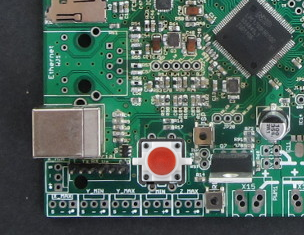
Simple Button
Wire a simple button on two pins.
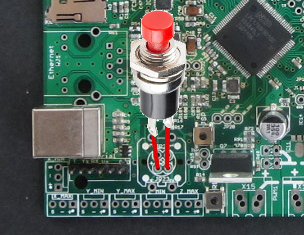
The pause mechanism causes the axis to stop immediately with no deceleration, and when restarted it continues at the speed it was going with no acceleration. This will most likely cause the stepper motors to skip and thus lose position.
The pause button may be configured as a kill switch instead of pause, this will halt all operations and turn off heaters and pause the host. It can be cleared with a
kill_button_enable                        true             # set to true to enable a kill button
kill_button_pin                           2.12             # kill button pin. default is same as pause button 2.12
[kill button]
enable = true                # set to true to enable a kill button
pin = 2.12                   # kill button pin
toggle_enable = false        # if true, button down triggers kill and button up triggers unkill
unkill_enable = true         # if true, allows the button to clear halt state (2 second press required when toggle_enable is false)
When in the halted state (after kill button is pressed) the play LED will flash rapidly, whereas when paused it flashes slowly.