G54 - Work Coordinate Systems

Overview
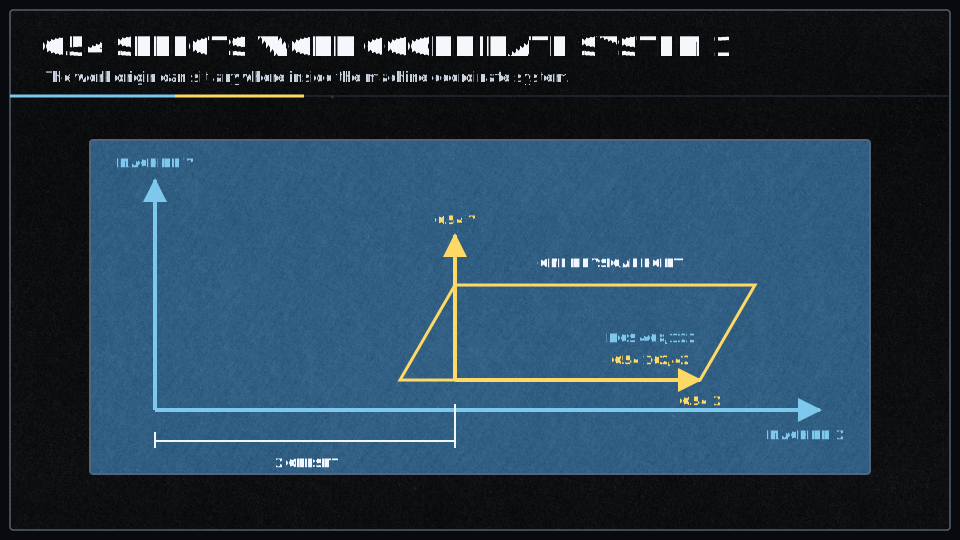
Work coordinate systems (WCS) provide a way to set different coordinate origins for different parts or setups. Instead of recalculating coordinates for each part, you can define a WCS for each part (each at its own 0,0,0 point), then switch between them with a single G-code command.
What Are Work Coordinate Systems?
Machine coordinates = Work coordinate system offset + Commanded coordinates
Available Work Coordinate Systems
Smoothieware supports nine work coordinate systems:
| Command | WCS Number | Name | Default |
|---|---|---|---|
| 1 | Work Coordinate System 1 | Yes | |
| 2 | Work Coordinate System 2 | ||
| 3 | Work Coordinate System 3 | ||
| 4 | Work Coordinate System 4 | ||
| 5 | Work Coordinate System 5 | ||
| 6 | Work Coordinate System 6 | ||
| 7 | Extended WCS 7 | ||
| 8 | Extended WCS 8 | ||
| 9 | Extended WCS 9 |
Syntax
G54      ; Select WCS 1
G55      ; Select WCS 2
G59.3    ; Select WCS 9 (extended)
Parameters
Work coordinate system selection has no parameters. The command simply selects which WCS is active for subsequent moves.
Behavior
- Modal command: Once selected, a WCS remains active until a different one is selected
- Default on power-up:
G54 is the default active WCS - Applies to all axes: X, Y, Z, and any additional axes use the same WCS offset
- Persistent: WCS offsets are stored in configuration and persist across power cycles
Setting Work Coordinate System Offsets
Use the
G10 L2 P1 X0 Y0 Z0         ; Set G54 offset to 0,0,0
G10 L2 P1 X10 Y20 Z5       ; Set G54 offset to X=10, Y=20, Z=5
G10 L2 P2 X100 Y0 Z0       ; Set G55 offset to X=100, Y=0, Z=0
G10 L2 P5 X0 Y0 Z-5        ; Set G58 offset to X=0, Y=0, Z=-5
The P parameter specifies which WCS to modify (1-9). See the
Examples
Example 1: Two Parts on One Table
; Part 1 positioned at machine X=10, Y=20
G10 L2 P1 X10 Y20 Z0      ; Set G54 (WCS 1) to part 1 location
G54                        ; Select G54
G0 X0 Y0 Z0               ; Move to part 1 origin (actually machine 10,20,0)

; Part 2 positioned at machine X=110, Y=20
G10 L2 P2 X110 Y20 Z0     ; Set G55 (WCS 2) to part 2 location
G55                        ; Select G55
G0 X0 Y0 Z0               ; Move to part 2 origin (actually machine 110,20,0)
Example 2: Setting WCS After Probing Bed
G28                        ; Home all axes
G0 Z5                      ; Move to probing height
G30                        ; Probe bed and set Z=0
G10 L2 P1 Z0               ; Set G54 Z offset to current position
Example 3: Querying Active WCS
$G ; Report current modal state (includes active WCS)
Output will show which WCS is currently active.
Related Commands
G10 - Set WCS offsets viaG10 L2 P[number]G53 - Use machine coordinates (bypass WCS for one move)G92 - Set position offset (adds to WCS offset)M500 - Save WCS offsets to SD card (config-override)M501 - Read WCS offsets from SD card
G10 - Set WCS offsets viaG10 L2 P[number]G53 - Use machine coordinates (bypass WCS for one move)G92 - Set position offset (adds to WCS offset)M500 - Save WCS offsets to SD card (config-override)M501 - Read WCS offsets from SD card
Use Cases
CNC Machining:
- Multiple parts on one machine bed, each with their own WCS
- Rotating workpieces through multiple operations
- Tool change positions in machine coordinates
3D Printing:
- Less common (usually just
G54 ) - Can be used for multi-part beds
Pick and Place Machines:
- Each feeder position can have its own WCS
- Each board position on the table can have its own WCS
Important Notes
- Offset Addition:
G92 offsets are ADDED to WCS offsets. Both transforms apply. - Machine Coordinates:
G53 bypasses WCS offsets for a single move, useful for absolute positioning. - Persistence: WCS offsets are saved in configuration and restored on boot (with
M500 ). - Machine Coordinate System:
G54 -G59.3 are offsets from the machine coordinate system (MCS) established by homing.
Video Tutorial
Resources
For more detailed information about work coordinate systems:
- LinuxCNC WCS Documentation
G10 - Set OffsetsG53 - Use Machine CoordinatesG92 - Set Position Offset